
Built for sellers, by a seller
Not a general accounting package you have to bend into shape. Brick Books was designed specifically for LEGO® sellers, so it understands marketplace orders, postage, fees and second-hand stock from the start. It works without the internet too: your books live on your own computer, not on someone else’s server.
BrickLink tells you your revenue. Brick Books tells you your profit.
Start your 14-day free trial with your own books. No card, no account, and nothing to cancel. Or open the demo, the real program with a made-up seller's books in it. One payment of $79 USD, plus any applicable taxes.
Runs on Windows
BrickLink, Brick Owl and Square orders come in automatically, including filed and archived orders that other tools can quietly miss.
eBay comes in from its own Seller Hub report, and anything else imports from a spreadsheet or CSV. Map the columns once and it remembers the layout, so nothing you sell sits outside your books.
Sales, postage and fees are separated properly, because they are different things in your books. Marketplace fees are split out against the order that caused them.
Stripe, PayPal and Square fees come in as their own lines, each carrying the payment it came from, so your payment costs are never one mystery lump at the end of the month.
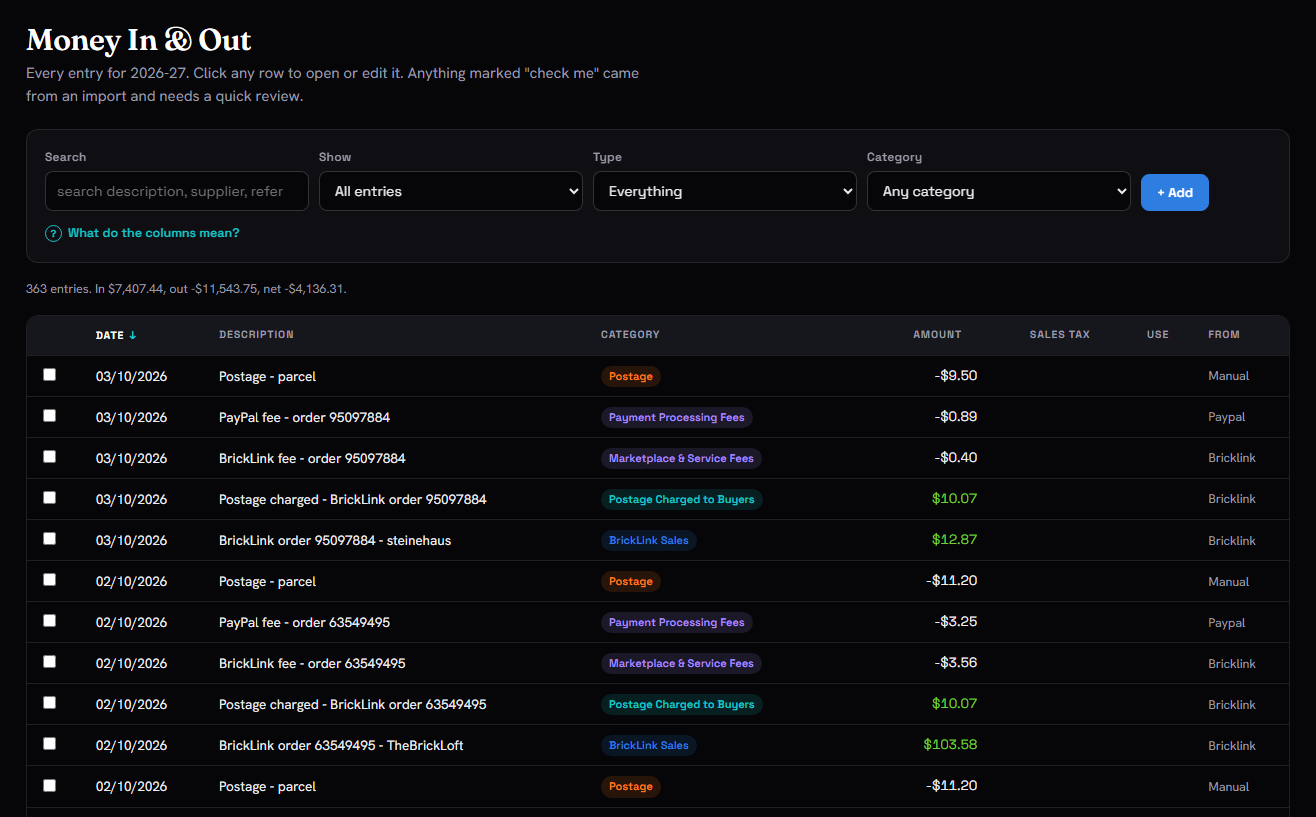 Screenshot: your orders, with fees and postage split out
A $40 sale is not $40 in your pocket. Take out the marketplace fee, the payment fee, the postage and what the item cost you, and the number left is the one that actually matters.
Unsold stock stays on your books as stock, not as an expense. So spending heavily on inventory this month does not suddenly make an otherwise good year look like a disaster.
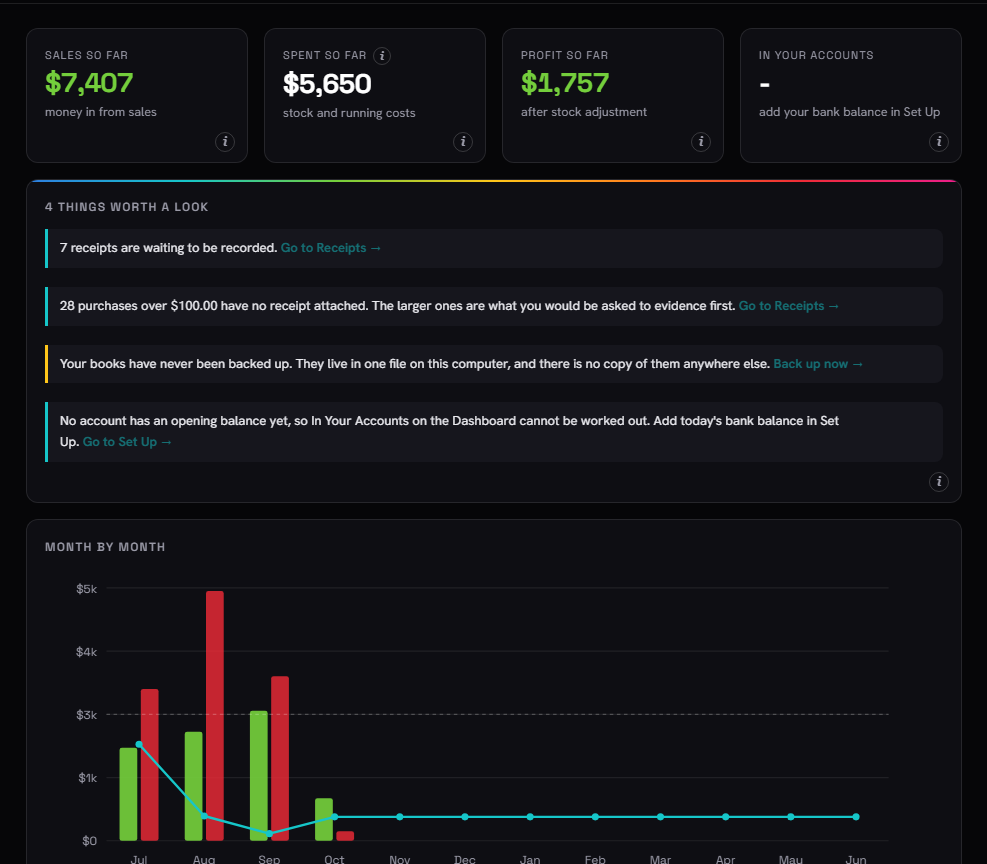 Screenshot: profit month by month, and where the money went
Drop in a receipt and Brick Books renames it and files it by date, supplier and amount, in the right year and month folder.
So when you need it again three years later, you can actually find it. Which is, after all, the entire point.
Attach a receipt while recording an entry and it stays linked to that entry for good.
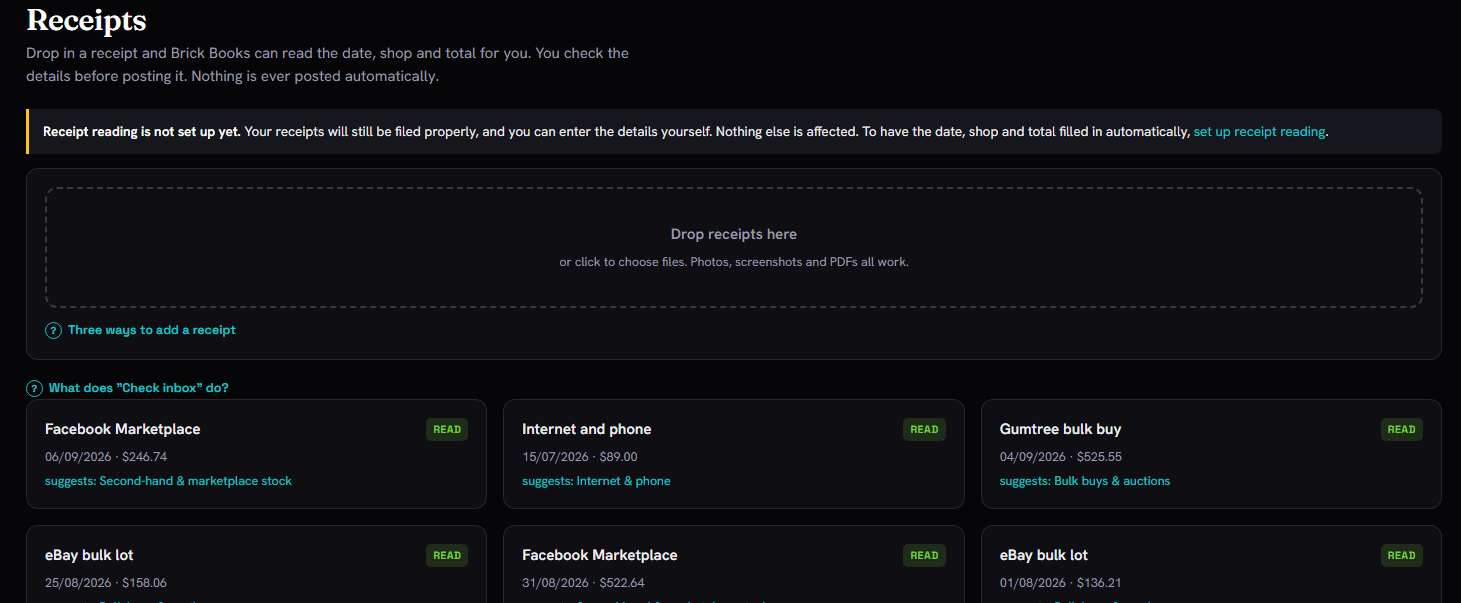 Screenshot: a receipt filed against its entry
Type in where you drove to. Brick Books looks up the road distance once and remembers it, so the same trip to the post office never has to be measured twice. Even a drive out to collect a bulk lot takes about ten seconds to log.
Kilometres or miles, whichever you use.
If your country allows a set rate for each business kilometre or mile, enter it once and Brick Books works out what your trips are worth.
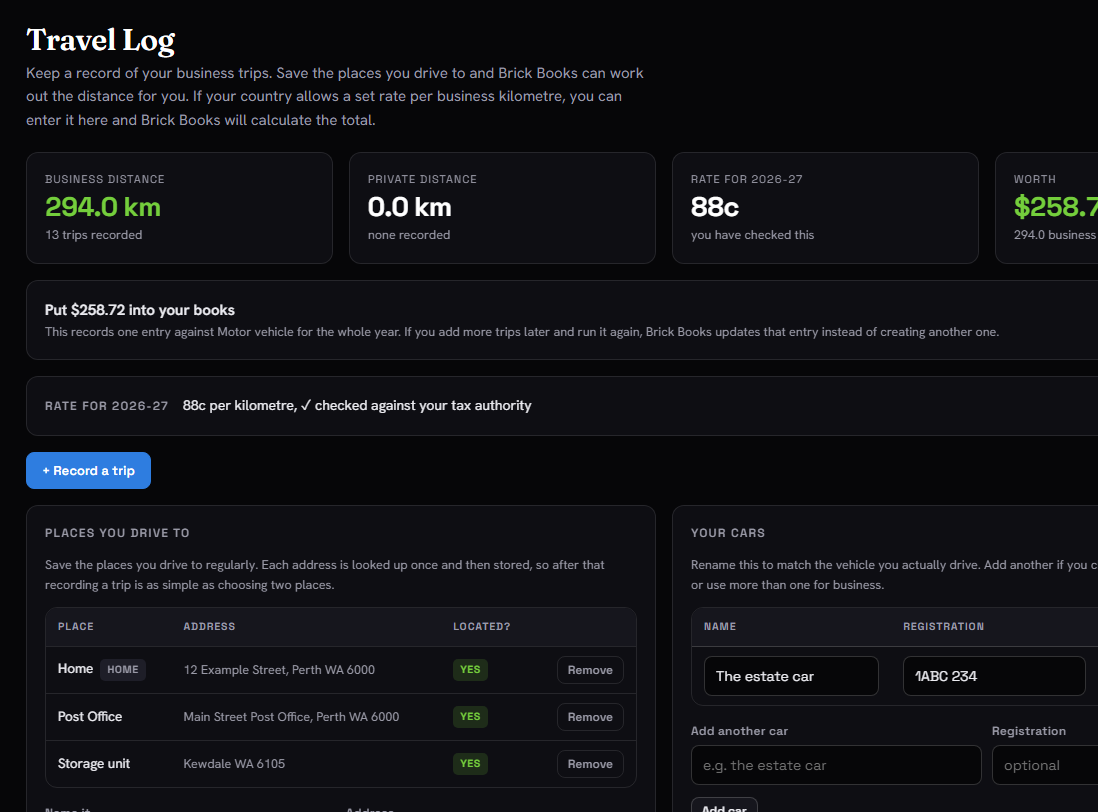 Screenshot: a year of trips, and what they add up to
One spreadsheet with the lot: profit and loss, trading stock, the full ledger, sales broken down by marketplace, and a clear trail showing where every figure came from.
Alongside it, a zip file of your receipts, named so each one ties directly back to the entry it belongs to.
The cover sheet states what has not been done just as clearly as what has. That is usually one of the first things an accountant has to work out for themselves, and time spent working it out is billable.
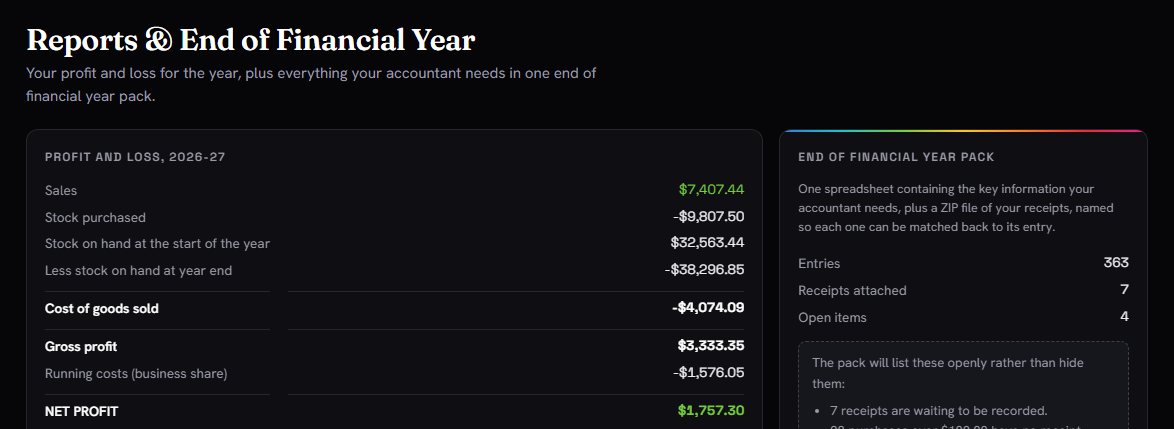 Screenshot: the end of financial year pack, sheet by sheet
Integrations include BrickLink, Brick Owl, Square, Stripe and PayPal, with more added as sellers ask for them. Every one of them is read-only: Brick Books can look at your orders and your fees, and can never move your money or change anything in your shop.
Orders arrive on their own, with goods, postage and marketplace fees split apart.
Every fee comes in as its own line, carrying the payment it came from, so your costs are not a mystery lump at the end of the month.
 S
Stripe
Supported
S
Stripe
Supported
 PP
PayPal
Supported
PP
PayPal
Supported
Selling somewhere else too? Import those orders from a spreadsheet or bank CSV so everything still ends up in the same books.
Want another marketplace connected properly? Ask for it. Requests help decide what gets built next.
One of the most common mistakes in reseller bookkeeping, and one reason your profit can look badly wrong even when nothing has actually been miscounted.
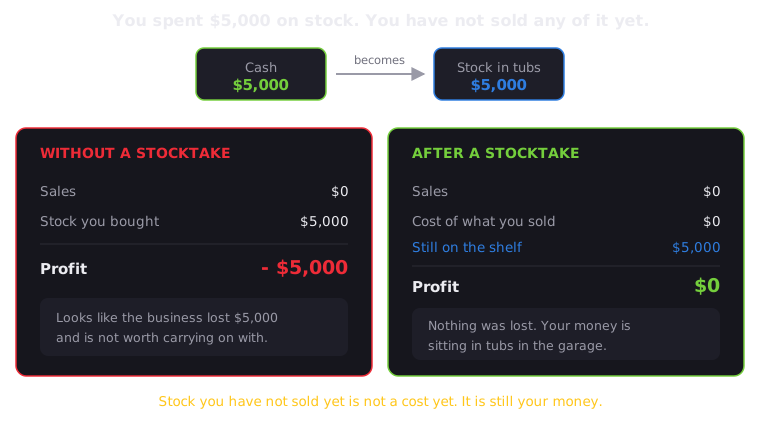
Same business. Same year. Very different result.
Without a stocktake, $5,000 of unsold stock looks like a $5,000 loss. Record what is
still on the shelf, and the books tell the real story.
Stock you have not sold yet is not the same as an ordinary running cost. The business still owns it, so leaving it out of your year-end stock figure can make a perfectly good year look much worse than it really was.
Brick Books runs on your own computer. Your figures stay there, there is no account to create, and there is no monthly bill.
One file. Open it and Brick Books runs in your browser like a website, while everything stays on your own computer.
Add your BrickLink, Brick Owl or Square credentials and your orders sync automatically, going back as far as you choose.
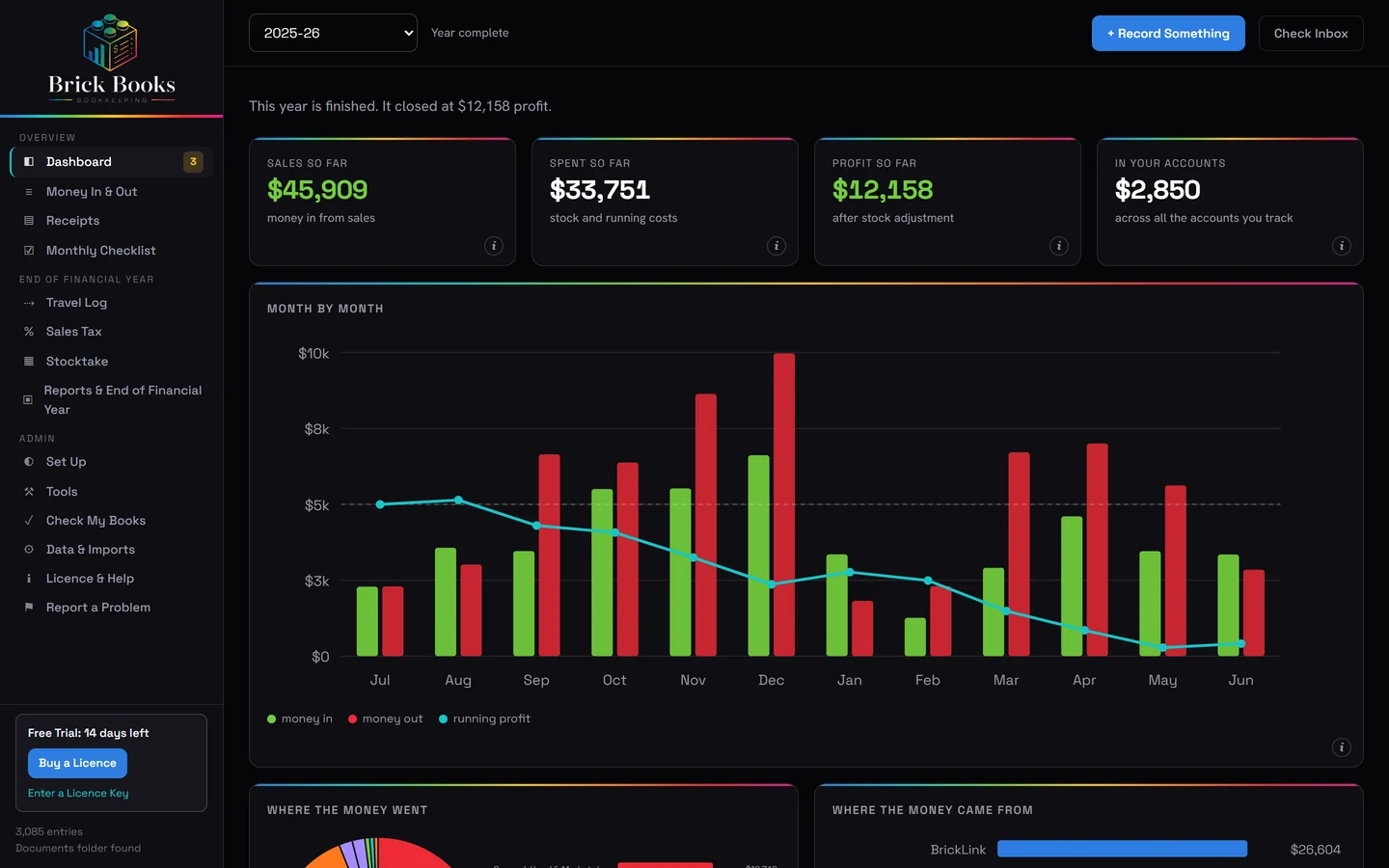
See your profit, costs, stock and fees month by month, then export clean figures in a spreadsheet your accountant will actually recognise.
Anything that lives on somebody else’s server can eventually be switched off, and sellers have been left stranded when that happens.
Brick Books is different. It is a program you own a copy of, running on your own computer. If this website disappeared tomorrow, your copy would carry on working exactly as it does today.
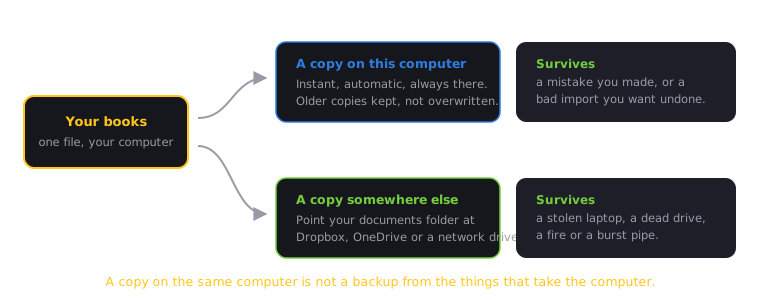
A backup on the same computer can save you from a mistake. A backup somewhere else can save you when the computer itself is the thing you lose.
Your books live in a single file on your own drive. Back it up, copy it or move it to another computer.
It is your file, and it stays yours.
Buy Brick Books once. There is nothing to renew and no recurring fee.
Your existing books remain accessible even without an active licence. You can open them, review and correct existing records, run reports, create backups and export your data.
Brick Books does not need a constant internet connection. Your books, reports, documents and day-to-day bookkeeping all keep working offline.
The internet is only needed when Brick Books has something online to talk to, such as synchronising orders with a marketplace or payment provider, checking for updates or using other online features.
Pay once. No subscription, no per-order cut, no recurring fees.
Brick Books
Launch price until 30 November 2026, then US$99.
+ applicable taxes*
*Any applicable taxes are calculated and added at checkout.
† One payment, nothing to renew. Every fix and improvement to Brick Books 1 is included. If a future Brick Books 2 is released with substantial new features, it may be offered as a paid upgrade at a reduced price for existing owners. The version you have already bought will keep working.
Want to try it first? Use Brick Books free for 14 days with your own books, no card needed, or try the demo, which is the complete program running on a fictional seller’s books.
Every product page tells you what something does. This is the other half, so nobody buys Brick Books expecting it to be something it is not.
Brick Books gives you clean books and a spreadsheet your accountant will recognise. What happens after that is between you and your accountant.
No listing, no pricing, no repricing, and no stock management for selling.
Brick Books reads your orders, but it never writes anything back to BrickLink or Brick Owl. That means it cannot change your listings, prices, stock levels, or anything else on either marketplace, even by accident.
It will not tell you what to buy, what to charge, or how to structure your business.
Brick Books tells you, as accurately as possible, what has already happened. The decisions stay yours.
This release is Windows only.
A macOS version is genuinely being considered for the future, and how soon it happens will depend largely on how many people want one.
If that is you, say the word.
No ticket number. No queue. No chatbot doing an impression of a person.
Just me, a LEGO® seller who got tired of doing all of this in spreadsheets.
I read and answer every email myself, as soon as I can, occasionally at an hour that strongly suggests I should have been asleep.
If your licence ends, Brick Books stops doing new work. You will not be able to record new entries, file new documents, sync new marketplace data, read receipts automatically, or build the end of financial year pack.
What it will never do is lock you out of the books you have already created.
You can still open and review your books, correct existing entries, access your reports, and export your data whenever you want.
Your books stay yours.
No.
Brick Books was built by a LEGO® seller who did not have a bookkeeping background either. Every screen explains what it is asking for, why it matters, and what to do next, in plain English rather than accounting language.
No.
Your books live on your own computer, so recording entries, viewing reports, opening documents, creating backups and exporting your data all work without an internet connection.
The internet is only used when Brick Books needs to talk to an outside service, such as:
Once your licence is activated, Brick Books checks it locally on your computer.
Yes.
You create your own API credentials on BrickLink’s website and paste them into Brick Books.
BrickLink also requires your current public IP address to be added to the token whitelist. That sounds more complicated than it is, and Brick Books includes a step-by-step guide.
Also supported, and simpler.
Brick Owl uses a single API key. Once connected, your orders can sync into Brick Books with goods and postage separated.
Yes.
Whether you take payments at a market stall, through a Square online store, or both, Brick Books can bring Square orders in and separate the goods, postage and processing fees.
At the moment, all Square sales are recorded under the same sales channel. Separating different Square channels, such as market stalls and online sales, is a planned improvement.
Your books stay accessible.
You can still open them, review and correct existing entries, search, run reports, create backups and export your data.
A licence is only needed to keep doing new work, such as:
That distinction is deliberate. Your existing business records should never become inaccessible because a licence ended.
No.
You buy Brick Books once. Your licence key does not expire, there is nothing to renew, and there is no subscription.
Sometimes outside services change their APIs or requirements.
If that happens, Brick Books may need an update before syncing works again. Your existing books are unaffected because they remain stored locally on your computer.
Everything that does not rely on that outside service continues to work normally.
No, and it does not pretend to.
Brick Books does not complete tax forms, calculate what tax you owe, or decide what you are allowed to claim.
What it does is get your records organised.
The end-of-financial-year pack can bring together things such as:
You can then give that pack to your accountant or use it as the basis for preparing your own return.
On your computer.
Your books are stored locally, and Brick Books does not require an online account or cloud database to hold them.
Some optional features do use outside services:
Your bookkeeping entries and financial figures are not included in the update check.
Automatic update checks can be turned off under Licence & Help.
There is nothing to stop paying.
Brick Books is a one-time purchase. There is no recurring subscription and no renewal date.
Fixes and improvements to Brick Books 1 are included for the life of version 1.
If a future Brick Books 2 is released with substantial new features, it may be offered as a paid upgrade at a reduced price for existing owners. Your existing version will keep working whether you upgrade or not.
Yes, in two ways.
The online demo lets you explore the real Brick Books interface using a fictional seller’s books, without installing anything.
The 14-day free trial lets you use the full program with your own books.
No card, no account, and nothing to cancel.
If you decide to buy, add your licence key to the copy you have already been using. Everything you entered during the trial stays exactly where it is.
Brick Books includes a 14-day free trial of the full program so you can make sure it suits you before you buy.
Because of that, change-of-mind refunds are not offered.
If Brick Books does not work as described, that is a different matter. Nothing here limits any rights you may have under consumer law.
A real person reads these, the same one who wrote the program.
I’ll reply to the email address you provided as soon as I can.
Please try again in a few minutes.
 BL
BL
 BO
BO
 SQ
SQ