
Brick Books → Guides → Bringing Your Existing Books Across
Getting your existing spreadsheet or bank CSV into Brick Books without retyping everything.
Almost nobody starts with an empty set of books. If you have been keeping a spreadsheet, or you can export transactions from your bank or payment provider, you can bring that history across instead of typing a year of entries again.
.xlsx file or CSVYour marketplace sales usually do not need importing here. Once BrickLink and Brick Owl are connected, Brick Books brings those orders in directly, going back as far as the marketplace makes them available.
This import is mainly for the money side of your books and anything you have previously recorded by hand.
Find the card headed Import a Spreadsheet or CSV.
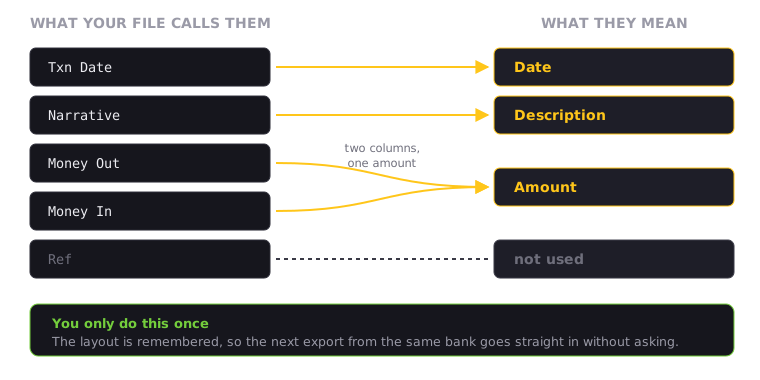
Brick Books reads the headings and asks which columns contain the date, description and amount.
It can handle spreadsheets with a title or blank rows above the headings, and if an Excel workbook contains several sheets, you can choose the one that holds your transactions.
Tell Brick Books what each column means.
That layout is remembered, so the next file exported in the same format can go straight in without making you map everything again.
.xls file
The older .xls format cannot be read directly.
Open the file in Excel or another spreadsheet program, choose
Save As, and save it as .xlsx or CSV instead.
If you try to import an .xls file, Brick Books will tell you what to
do rather than simply refusing it.
Every ordinary entry brought in by an import is marked CHECK ME. That means you can review and categorise imported entries before relying on them in your books.
The exception is a fee column you deliberately mapped as fees. Those amounts can go directly to your payment-fees category because you have already told Brick Books exactly what they are.
You can undo it.
Every import is listed under Data & Imports with an Undo option beside it.
Undo removes only the entries created by that particular import. Everything else in your books is left alone.
Direct access to bank accounts is much more complicated than connecting to a marketplace.
Depending on the country and bank, it can involve regulated open-banking systems, accredited providers, third-party aggregators and ongoing service costs.
Brick Books deliberately avoids building that dependency into your bookkeeping.
Instead, download a transaction CSV from your bank and import it. It usually takes less than a minute, costs nothing, and means another company does not need permanent access to your bank account just to keep your books up to date.
You do not have to import every transaction you have ever recorded.
If your old spreadsheet gets unreliable further back, start from the point you actually trust and enter your opening balances for that date under Set Up.
Importing three years of guesses does not make them more accurate. It just gives you three years of figures you cannot rely on.