
Brick Books → Guides → Backups and Restoring
Taking a safe copy of your books, keeping another copy somewhere else, and what happens when you restore one.
Your books live in a single file on your own computer. That is one of Brick Books' strengths, but it also means there is no server of mine quietly keeping another copy for you.
Setting up backups takes about a minute, and it is worth doing early.
Go to Data & Imports → Files & Backups, then press Back up now.
Brick Books shows you when the last backup was taken, how many copies exist on this computer, how many are in your documents folder, and how large your books currently are.
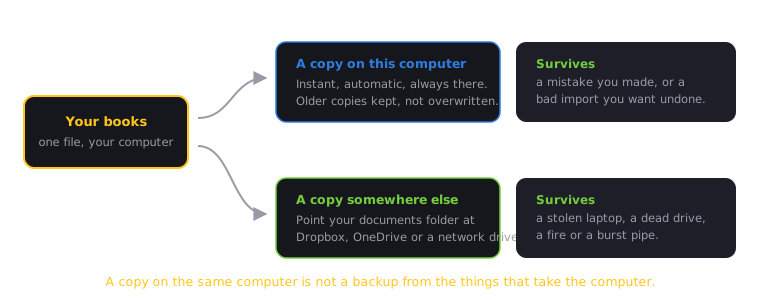
A local backup can protect you from a bad edit, a mistaken import, or something else you want to undo.
It cannot protect you if the computer itself is lost, stolen or damaged.
Point your documents folder at a location that is also stored elsewhere, such as Dropbox, OneDrive, iCloud or a network drive, and Brick Books can place another copy there too.
That second copy is the one that still exists if the computer does not.
Restoring is deliberately more cautious than most actions in Brick Books, because it replaces your current books with an earlier copy.
Choose a backup and Brick Books first shows you what is inside it, when it was taken, and how many entries it contains.
Nothing is replaced until you confirm.
Before Brick Books restores anything, it automatically saves a backup of the books you have right now.
So if you restore the wrong copy, the version you just replaced has not disappeared. You can restore that one again in exactly the same way.
Good times to make an extra backup include:
Brick Books also takes precautions around important changes, but making an extra backup before doing something substantial costs very little and can save a lot of work if you change your mind afterwards.
Backing up and restoring remain available whether your licence is active or not.
Your existing books, reports, exports and backups remain yours.
Accessing and protecting records you have already created is never the part Brick Books takes away.